Rosie’s Field Guide to Smart Glasses
A quick guide to smart glasses and how to notice if they are recording.
If you are trying to tell whether smart glasses are recording, the first challenge is that different models use different signals.
Last fully reviewed: 8 August 2026. Hardware, firmware and indicator behaviour can change.
Common models and their recording signals
Open a model to compare the visible cues with its documented photo, video and microphone signals. An unknown signal is shown as unknown rather than filled with an assumption.
Ray-Ban MetaRay-Ban and MetaCamera built in
Recognition cues
- The frames can resemble ordinary Ray-Ban glasses.
- A camera opening and a separate outward-facing capture light sit on the front of the frame.
- The outward capture light is different from the inward notification light seen by the wearer.
Camera and indicator
- Camera status
- Camera built in. An outward-facing camera supports photos and video.
- Indicator location
- On the outside front of the frame, separate from the camera lens.
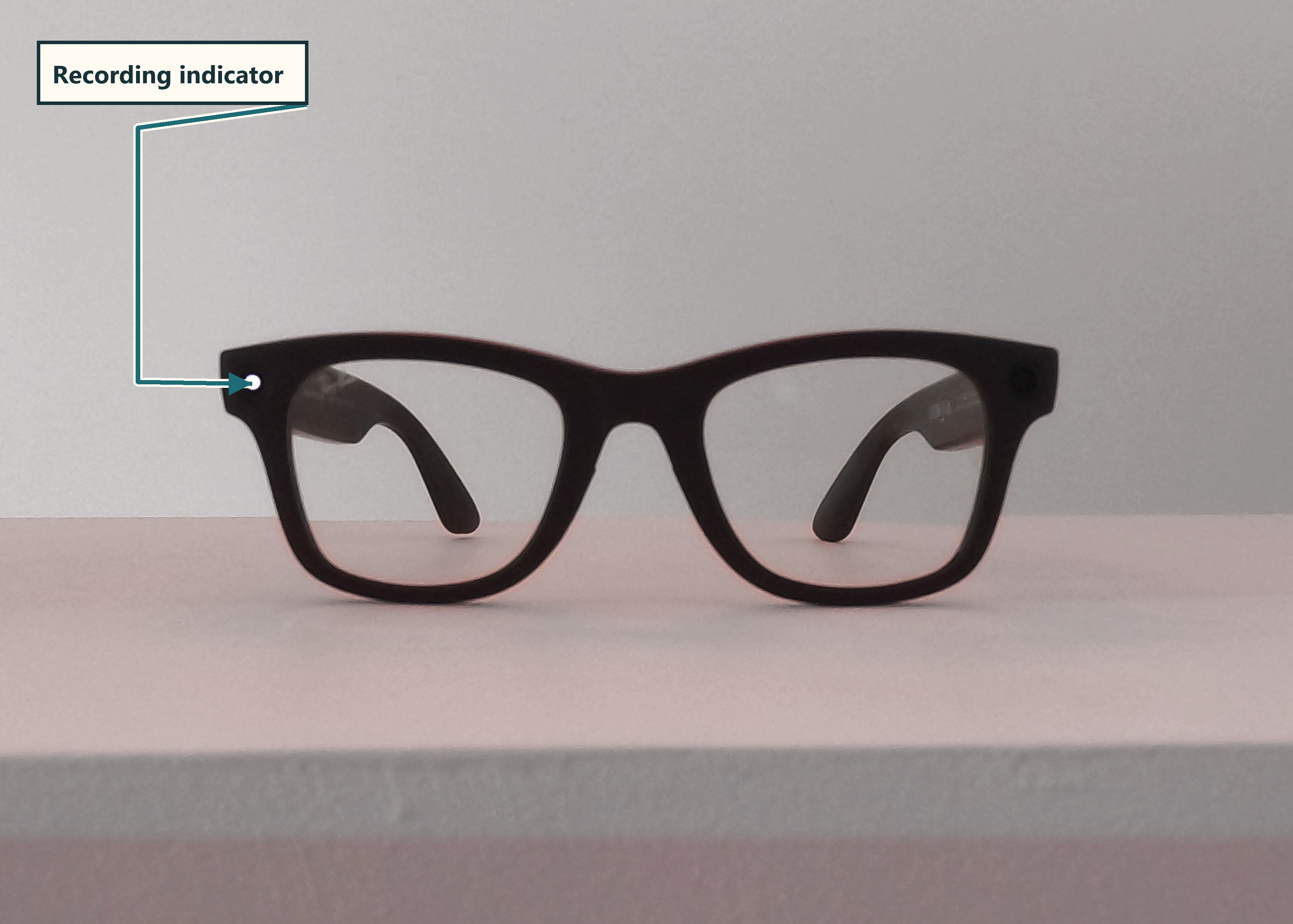
What signal should a bystander look for?
Photo
The outward capture light blinks white once.
Video
The outward capture light remains solid white while video is recording.
Microphone or audio capture
No general outward microphone indicator is documented for calls, ordinary voice use or AI processing. The wearer may see an inward status light.
Oakley Meta HSTNOakley and MetaCamera built in
Recognition cues
- A camera and separate outward capture light are built into the front of the frame.
- The owner-photographed view identifies the camera and separate outward capture indicator on a non-working sample.
- An inward status light is intended for the wearer and may not be visible to a bystander.
Camera and indicator
- Camera status
- Camera built in. An outward-facing camera supports photos and video.
- Indicator location
- On the outward-facing frame, separate from the camera lens.
Documentary views
Owner-photographed views
1 of 1
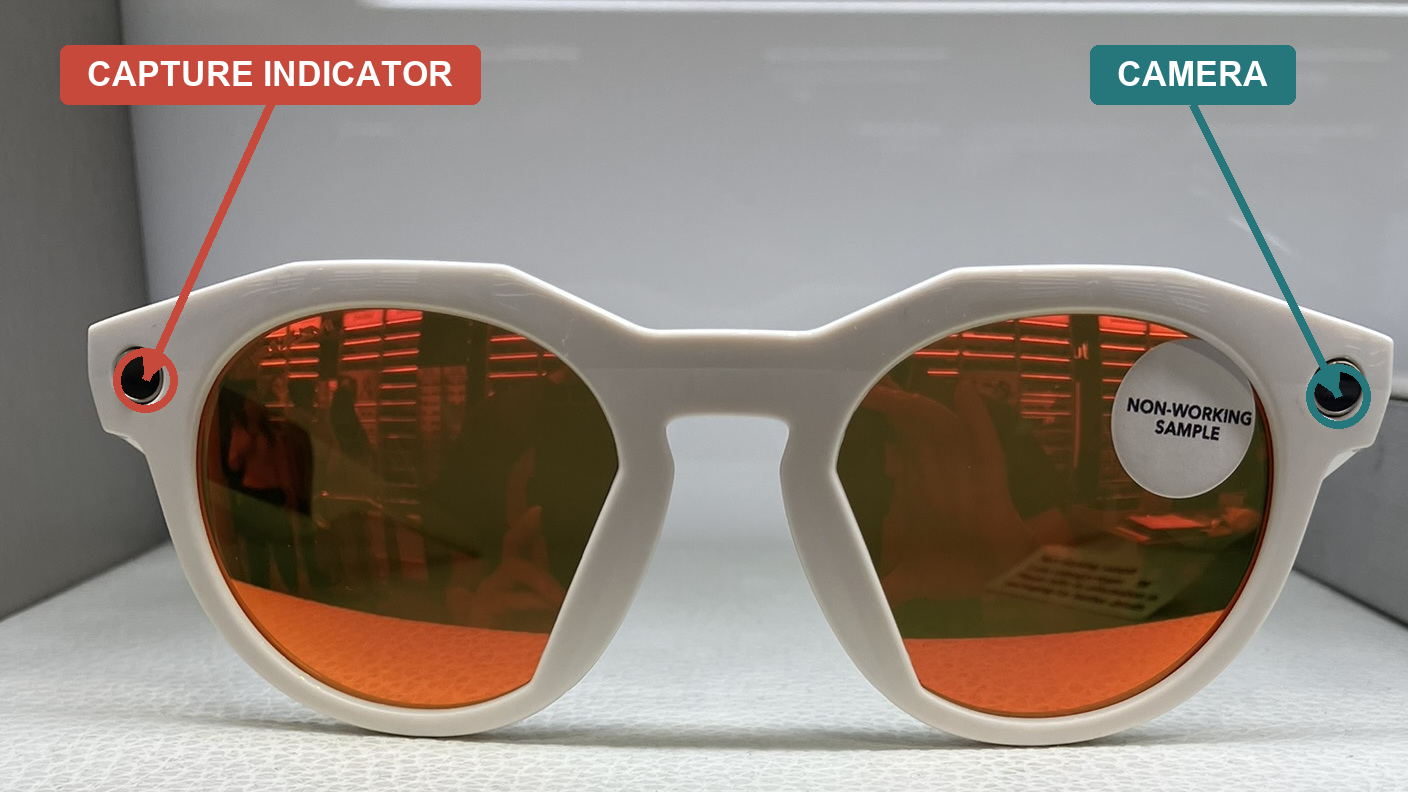
What signal should a bystander look for?
Photo
The outward capture light blinks white once.
Video
The outward capture light remains solid white while video is recording.
Microphone or audio capture
No general outward microphone indicator is documented for calls, ordinary voice use or AI processing. The wearer may see an inward status light.
Oakley Meta VanguardOakley and MetaCamera built in
Recognition cues
- The camera is centred in the sports-oriented frame.
- The owner-photographed views show the capture indicator above the nose-bridge camera when powered on.
- An inward-facing action light provides wearer feedback and should not be confused with the outward capture signal.
Camera and indicator
- Camera status
- Camera built in. A centred outward-facing camera supports photos and video.
- Indicator location
- Above the centred outward-facing camera on the front of the frame.
Documentary views
Owner-photographed views
1 of 2
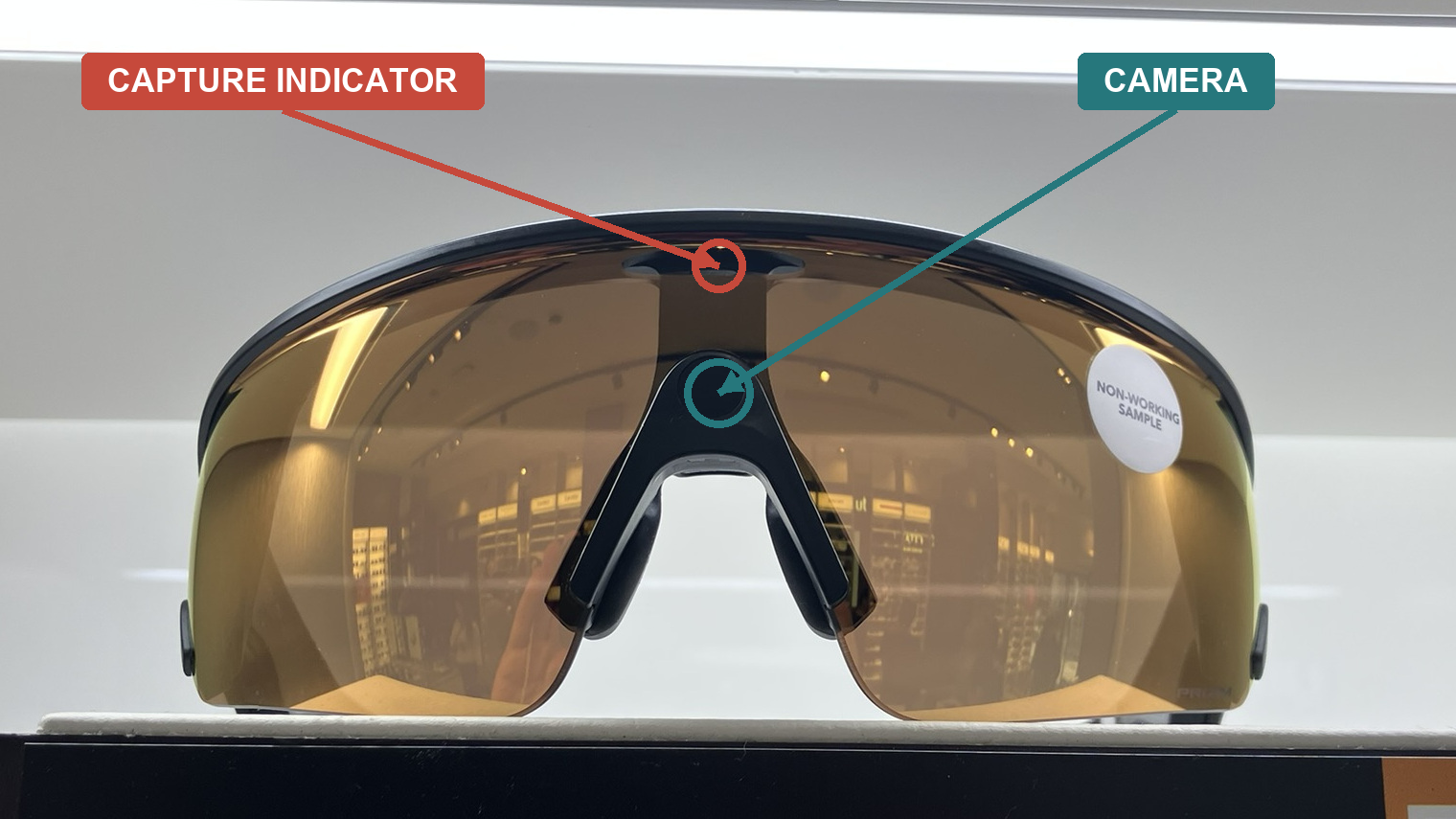
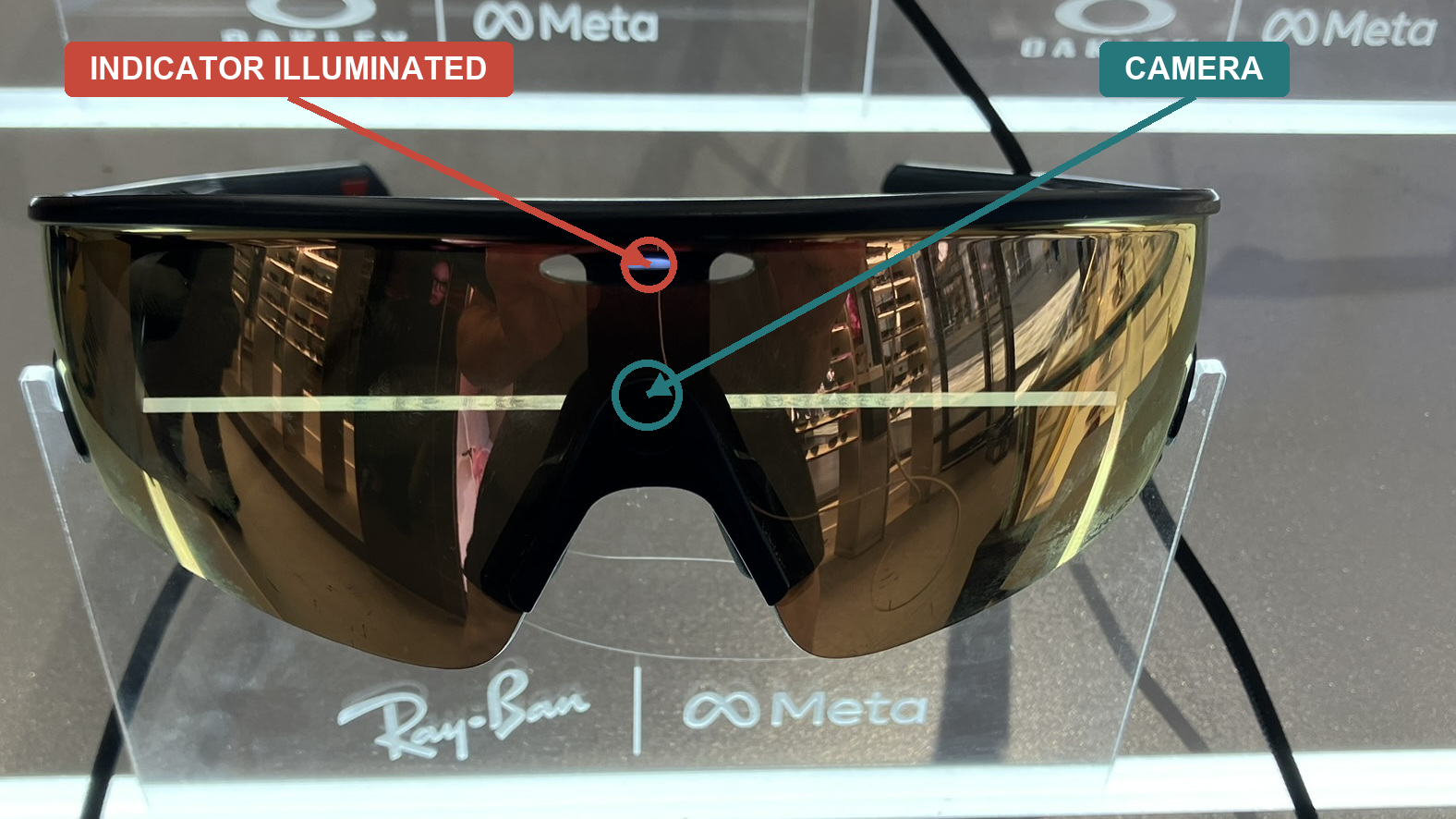
What signal should a bystander look for?
Photo
The outward capture light blinks white once.
Video
The outward capture light remains solid white while video is recording.
Microphone or audio capture
No general outward microphone indicator is documented for calls, ordinary voice use or AI processing. The wearer may see an inward status light.
Anko Camera GlassesAnkoCamera built in
Recognition cues
- The manual identifies separate front camera, flash and indicator components.
- A flash or blue light can appear during several different functions.
- A blue light is not a universal signal for video recording on this model.
Camera and indicator
- Camera status
- Camera built in. A front-facing camera is documented alongside a separate flash and blue indicator.
- Indicator location
- The manual documents a front flash and a separate front indicator near the camera.
What signal should a bystander look for?
Photo
The front flash briefly flashes and the blue indicator lights once.
Video
The front flash and blue indicator remain on while video is recording.
Microphone or audio capture
Indicator behaviour for calls and standalone audio recording was not verified. A continuous blue light is documented for voice-assistant use, but this is not a universal audio-capture signal.
Rokid GlassesRokidCamera built in
Recognition cues
- A camera is built into the front of the glasses.
- Rokid Japan documents a camera-operation light, but this guide does not yet have verified Australian imagery or function-by-function behaviour.
- Regional hardware and firmware should be checked before transferring the Japanese guidance to another unit.
Camera and indicator
- Camera status
- Camera built in. An outward-facing camera supports photo, video and visual-recognition functions.
- Indicator location
- Exact camera-light position has not been verified for Australian units.
What signal should a bystander look for?
Photo
A camera-operation light is documented by Rokid Japan. Exact Australian photo behaviour remains unverified.
Video
A camera-operation light is documented by Rokid Japan. Exact Australian video behaviour remains unverified.
Microphone or audio capture
No bystander-facing microphone or audio-capture signal was verified in the official material reviewed.
XREAL One Pro with optional XREAL EyeXREALCamera optional
Recognition cues
- Look for the detachable XREAL Eye module below the bridge.
- Without that module, the reviewed One Pro documentation does not list a built-in outward capture camera.
- No verified outward capture-indicator behaviour was found for the optional camera.
Camera and indicator
- Camera status
- Camera optional. One Pro does not document a built-in outward camera. The detachable XREAL Eye accessory adds a camera below the bridge.
- Indicator location
- No outward XREAL Eye capture-indicator location was verified in the official material reviewed.
What signal should a bystander look for?
Photo
The optional XREAL Eye can take photos. Its outward indicator behaviour was not verified.
Video
The optional XREAL Eye can record video. Its outward indicator behaviour was not verified.
Microphone or audio capture
One Pro supports recording and call audio, but no bystander-facing microphone indicator was verified.
Evidence and limits
Why the exact model matters
Manufacturer evidence
Hardware and indicator claims come from current official pages, FAQs and manuals. A manufacturer statement is not an independent test of every unit.
Firmware and region
Signals may vary between models, generations, regions and firmware. Guidance for one pair should not be transferred to another.
Unknown remains unknown
Where indicator behaviour could not be verified, the guide says so. Missing documentation is not proof that a microphone, sensor or signal is absent.